


It's 4:40 on a Friday. Twelve contractor payments need to go out, your finance lead is on a train, and the one person who can approve anything over $500 has their phone on silent at a kid's football game. The payments are small, boring, and exactly the same as last week. They're also stuck.
That's the usual result of an approval policy written on a nervous Monday. Somebody read a scary incident report, ticked every box, and now every transfer waits for two people. It feels safe. Mostly it trains your team to treat approvals as a rubber stamp, because they have to click "approve" forty times a week.
Good approval policies work the other way round. Routine money moves fast, unusual money waits, and everyone knows which is which before Friday comes around.
Key takeaways
- Sort by risk first. A known recipient at a normal amount is not the same as a new address at 10x the usual size. Your policy should treat them differently.
- Use thresholds you can explain. Pick numbers based on what you actually pay, not round numbers that felt right in a meeting.
- Roles beat names. Approvals should belong to roles with backups, so one person on holiday doesn't freeze payroll.
- Write down what gets refused. A short list of "no" cases your team agrees on in advance does more for safety than another approval step.
- Review the policy, not just the payments. If approvers approve 100% of requests, the policy is too tight or the review is too shallow.
Think of it like a corporate card, not a bank vault
Most companies already have a working approval policy. It's the company credit card.
You don't need your manager's signature to buy a $12 lunch with a client. You do need a conversation before you put a $9,000 conference sponsorship on it. And if the card suddenly gets used in a country nobody on the team has visited, it gets declined before anybody asks.
That's three layers: a default "yes" for small, normal spending, an escalation for bigger or stranger spending, and a hard "no" for things that should never happen. Team wallets need the same three layers. Most slow policies only have the middle one, applied to everything.
1. List what you actually pay
Before setting any number, pull the last two or three months of outgoing transfers. Group them roughly:
- Recurring payouts: contractors, payroll top-ups, vendors you pay on a schedule.
- Operational moves: topping up a hot wallet, moving funds between your own vaults.
- One-offs: a new supplier, a large purchase, a refund that's bigger than usual.
You'll usually find that the large majority of transactions by count are recurring and small, while a handful of one-offs make up most of the value. That split is where your policy lives.
2. Set thresholds from the data
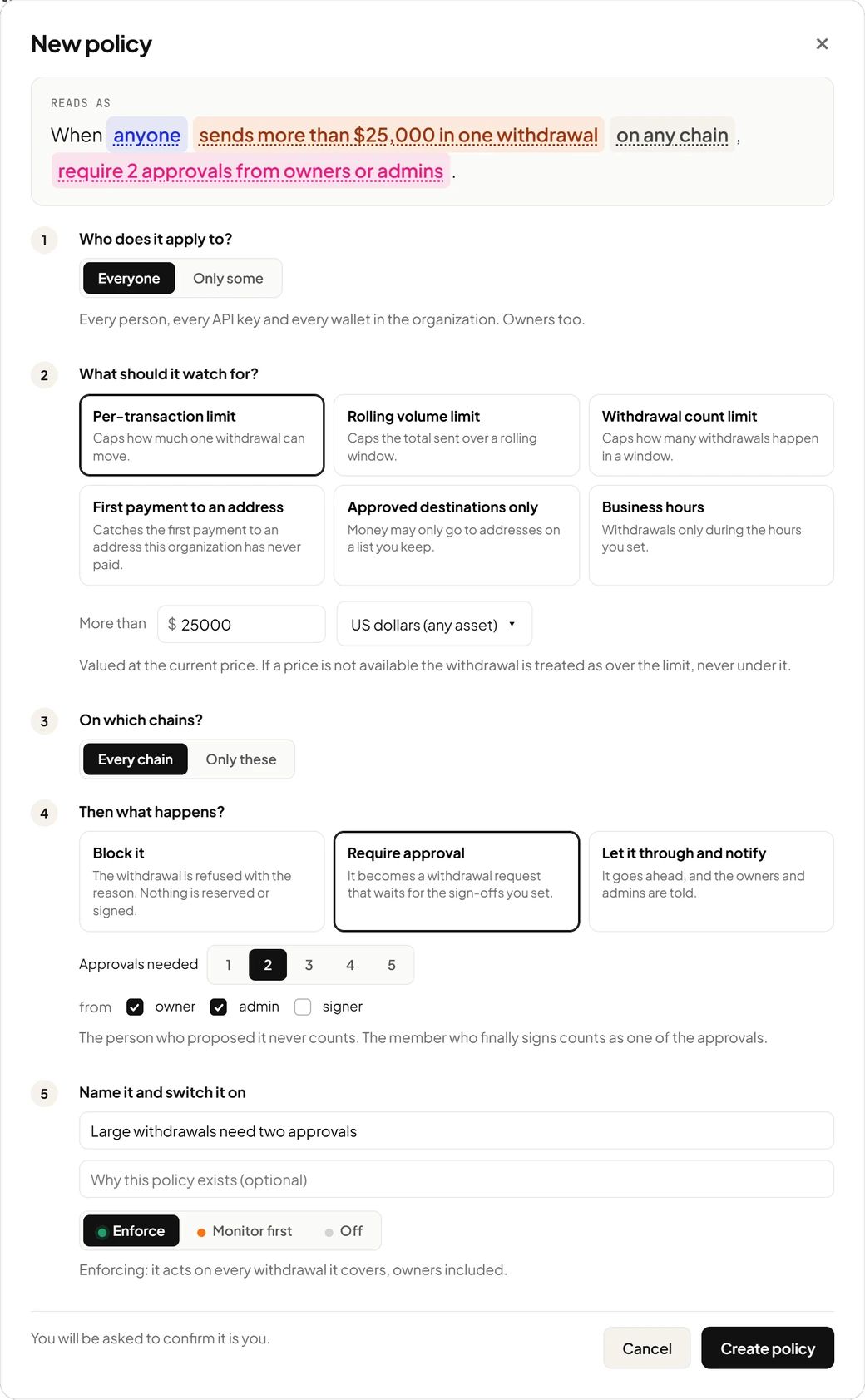
A threshold is the amount above which a transfer needs extra approval. Set it just above your normal recurring payment size, not at a round number.
If your biggest regular contractor payment is $3,200, a $500 threshold means every single payout waits for a second person. A $4,000 threshold means routine payments flow and anything unusual stands out. Same safety for the scary cases, far less friction for the boring ones.
It's common to use two or three tiers, for example:
- Under the threshold: no extra approval. Anyone allowed to sign for that wallet sends it.
- Above the threshold: someone other than the person who requested it has to approve, from the roles you choose.
- Well above it: two or more approvals, limited to your most senior people.
Keep it to three tiers at most. Nobody remembers five.
3. Add a time dimension
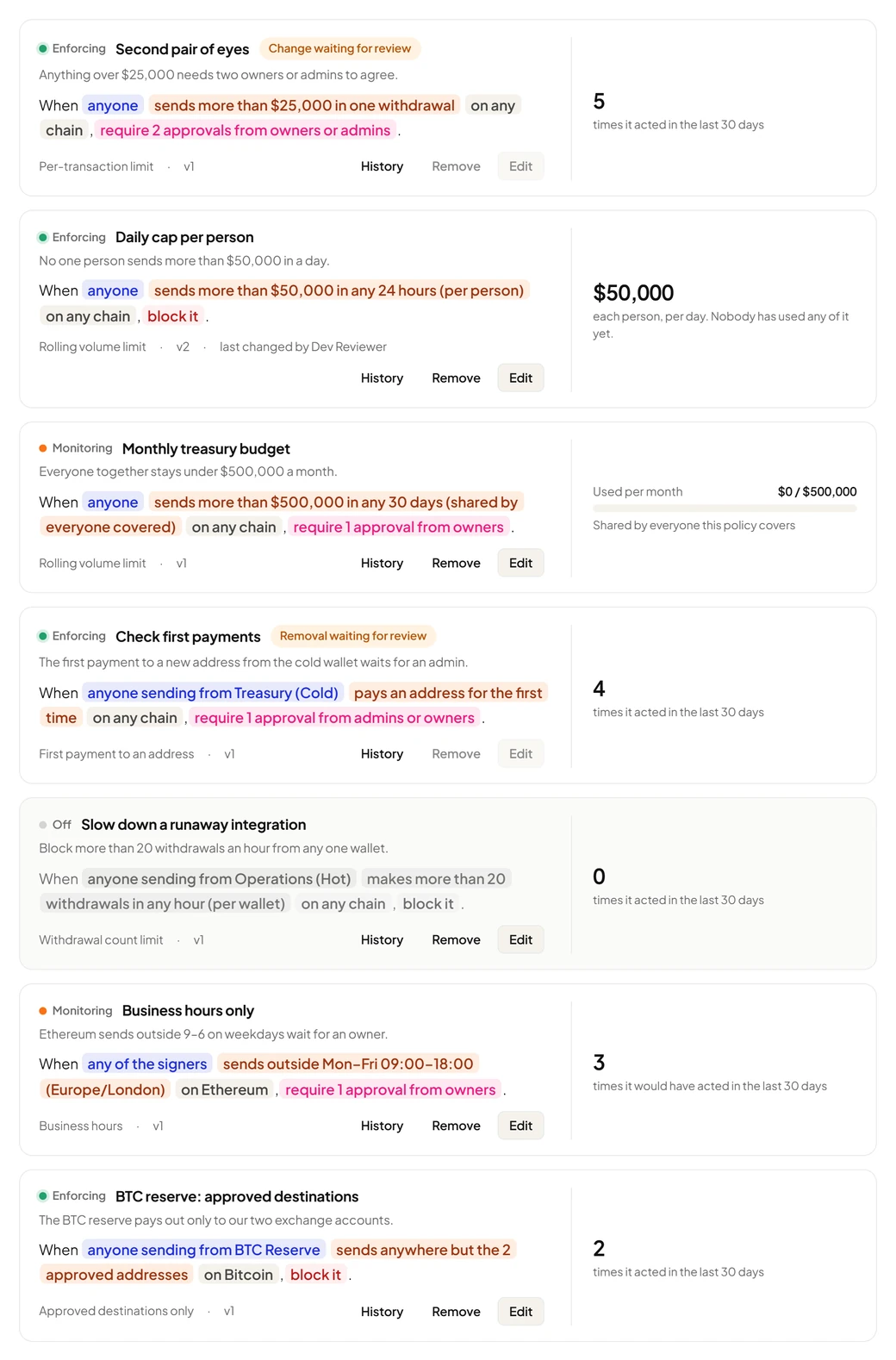
A per-transaction threshold has an obvious gap: someone can send ten payments just under the limit. That's why many teams also think in terms of spending limits (a cap on total outflow per day or week) and velocity (how many transactions happen in a short window).
You don't need fancy math here. Ask a simple question: "What's the most we'd ever legitimately send in a normal week?" Anything beyond that should slow down, even if each individual payment looks fine.
4. Assign roles, then assign backups
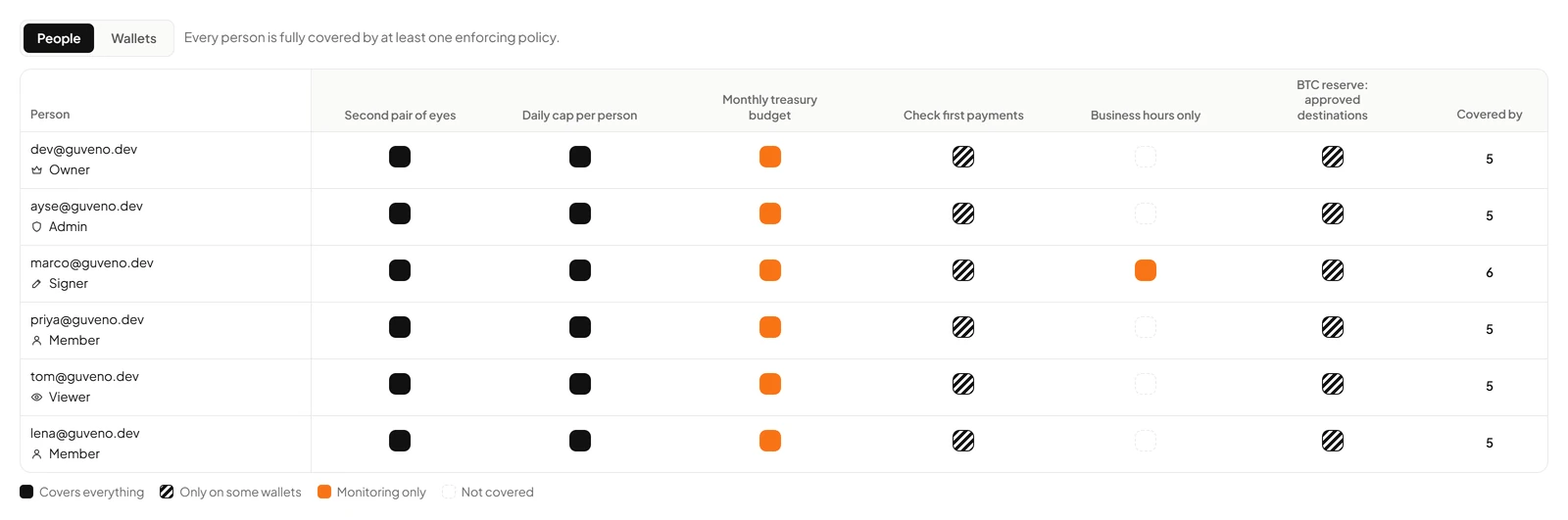
A role is a job in the approval flow, like requesting payments, approving them or managing the rules, rather than a specific person. Map people to roles, not the other way round.
The rules that keep Fridays moving:
- Every approval role has at least two people in it. If Sam is the only approver, Sam's dentist appointment is a payments outage.
- The person who requests a payment never approves it, for anything above the threshold. The whole point of a second look is that it comes from a second person.
- Keep at least two people who can change the policy, and don't make them the only approvers. Otherwise one compromised account can loosen the rules and then use them.
5. Group the boring stuff
If your recurring payouts go out on a schedule, get all the requests in early in the day. One approver reviews the whole list against last week's, checks anything that changed, then approves each request. That's one careful pass instead of twelve rushed ones.
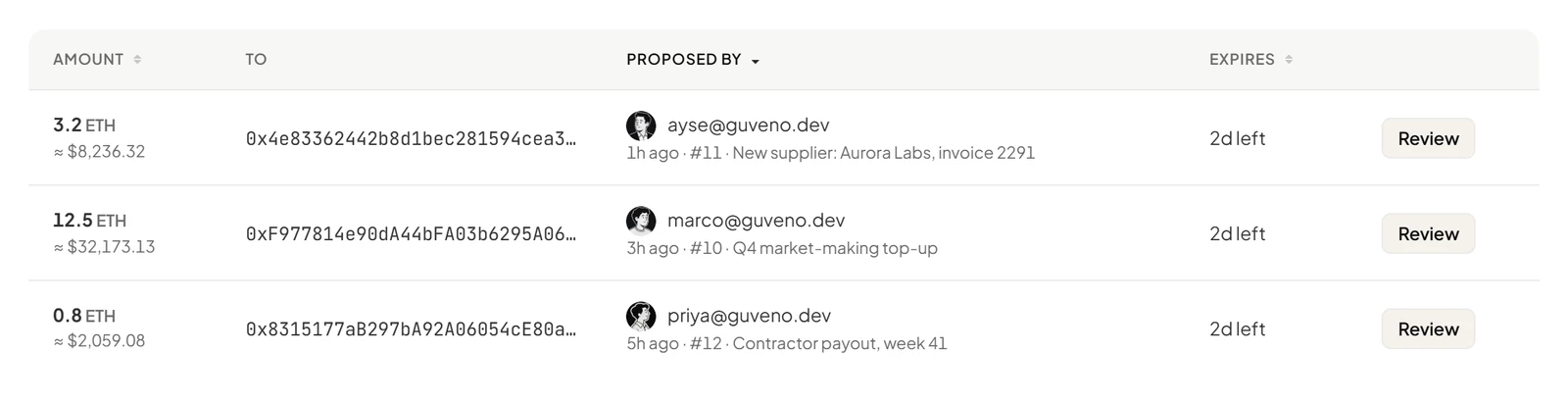
The trick is getting the requests in at 10am, not 4:40pm. Approval policies don't cause most Friday delays. Late requests do, and the policy just gets the blame.

6. Treat new addresses as their own risk tier
The most common way teams lose money isn't a giant transfer. It's a normal-sized payment to the wrong address, often after an "updated bank details" style message from a vendor.

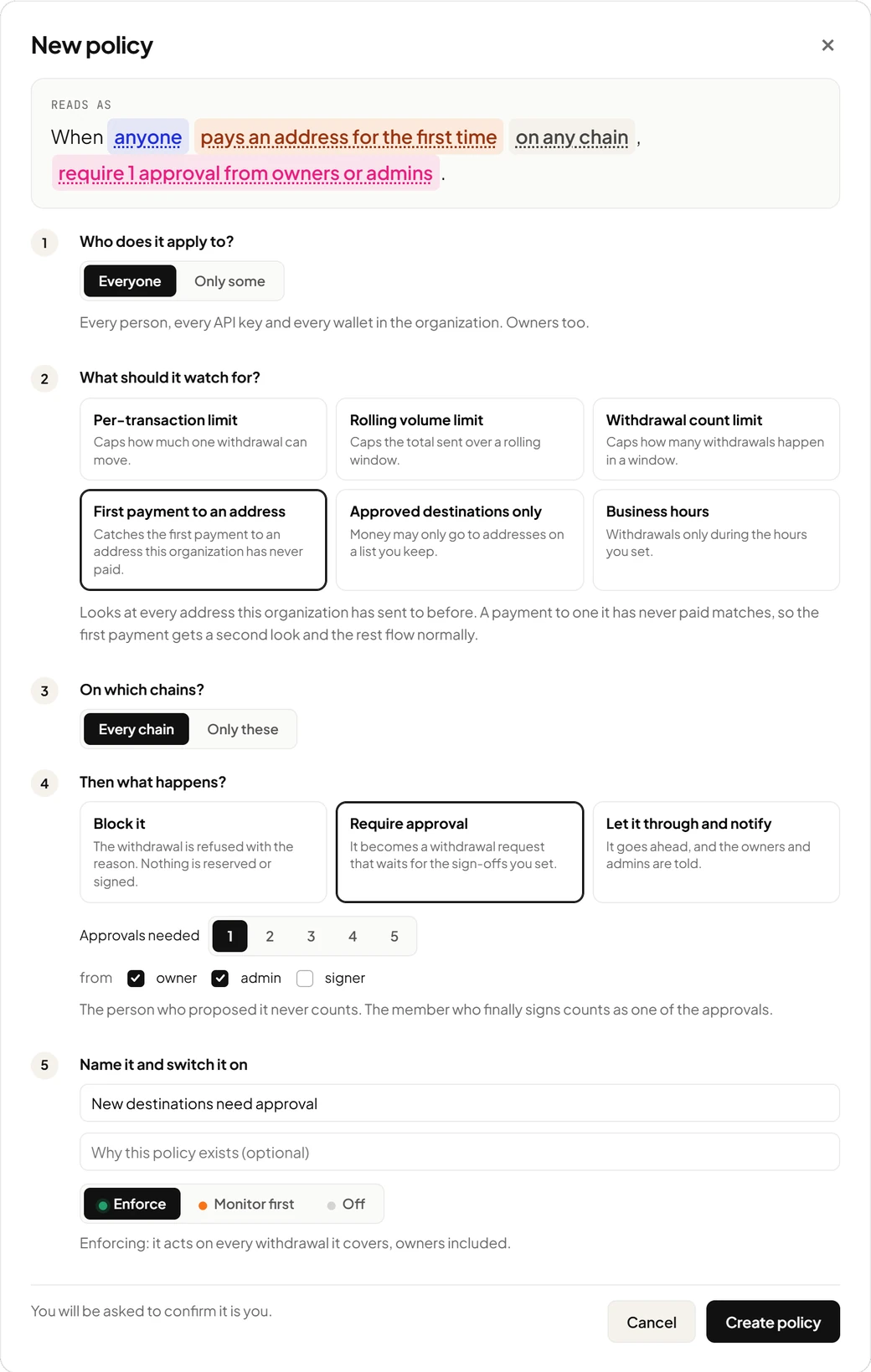
So make "first payment to a new address" its own trigger, regardless of amount. A good habit: confirm the new address through a second channel (a call, or a message on a channel you already trust) and send a small test amount first. Once an address has been verified and paid, it can join the routine tier, or go on a short list of approved addresses.
Write your refusals down
Refusals are the cases where the answer is "no" before anyone opens the request. They save time because nobody debates them under pressure. A starting list:
- Address changes requested by email or chat alone, with no second-channel confirmation.
- Payments where the person who requested them is also the recipient.
- "Urgent, please skip approval just this once" requests. Especially from the CEO. Especially on a Friday.
- Transfers to addresses that don't match the vendor's verified record.
- Any request that asks you to share a recovery phrase. There is no legitimate reason for this. Ever.
Only two refusals like these can be enforced by Guveno itself: approved destinations only, and a check on the first payment to a new address. The rest (address changes requested over email, "skip approval just this once", a requester who is also the recipient) are human rules your team holds to, because Guveno can't detect them.
If something on the list turns out to be legit, the requester can go through the slow path. That's fine. The slow path exists for exactly that.
Things to avoid
- Approving everything twice. Two approvals on a $40 payment don't add safety. They add fatigue, and fatigued approvers click "yes" without reading.
- Single points of failure. One approver, one admin, or one person who knows where the recovery phrase is stored. Each one is a holiday away from a frozen wallet.
- Policies nobody can explain. If a new teammate can't tell you why the threshold is $4,000 and not $1,000, it's probably arbitrary and probably wrong.
- Silent overrides. If someone has to bypass the policy, it should be visible and logged, not handled with a quiet workaround that becomes the new normal.
- Set-and-forget. Your payment patterns change. A threshold that made sense at ten contractors may be silly at forty.
A quick health check
Every month or quarter, look at three numbers:
- How many requests needed a second approval? If it's most of them, your threshold is too low.
- How long did approvals take on average? If routine payments wait hours, look at roles and backups.
- How many requests were rejected or questioned? If the answer is zero, either your team is perfect or nobody is really reviewing. It's usually the second one.
Where Guveno helps
Guveno is a self-custody wallet built for teams. Each vault has its own recovery phrase, which means your organization holds the keys, not us. Roles (owner, admin, signer, member and viewer) and vault key copies decide who can send from each wallet. Spending policies, on the Pro and Enterprise plans, decide when a payment needs approval, how many sign-offs it needs and from which roles, and what gets blocked outright.
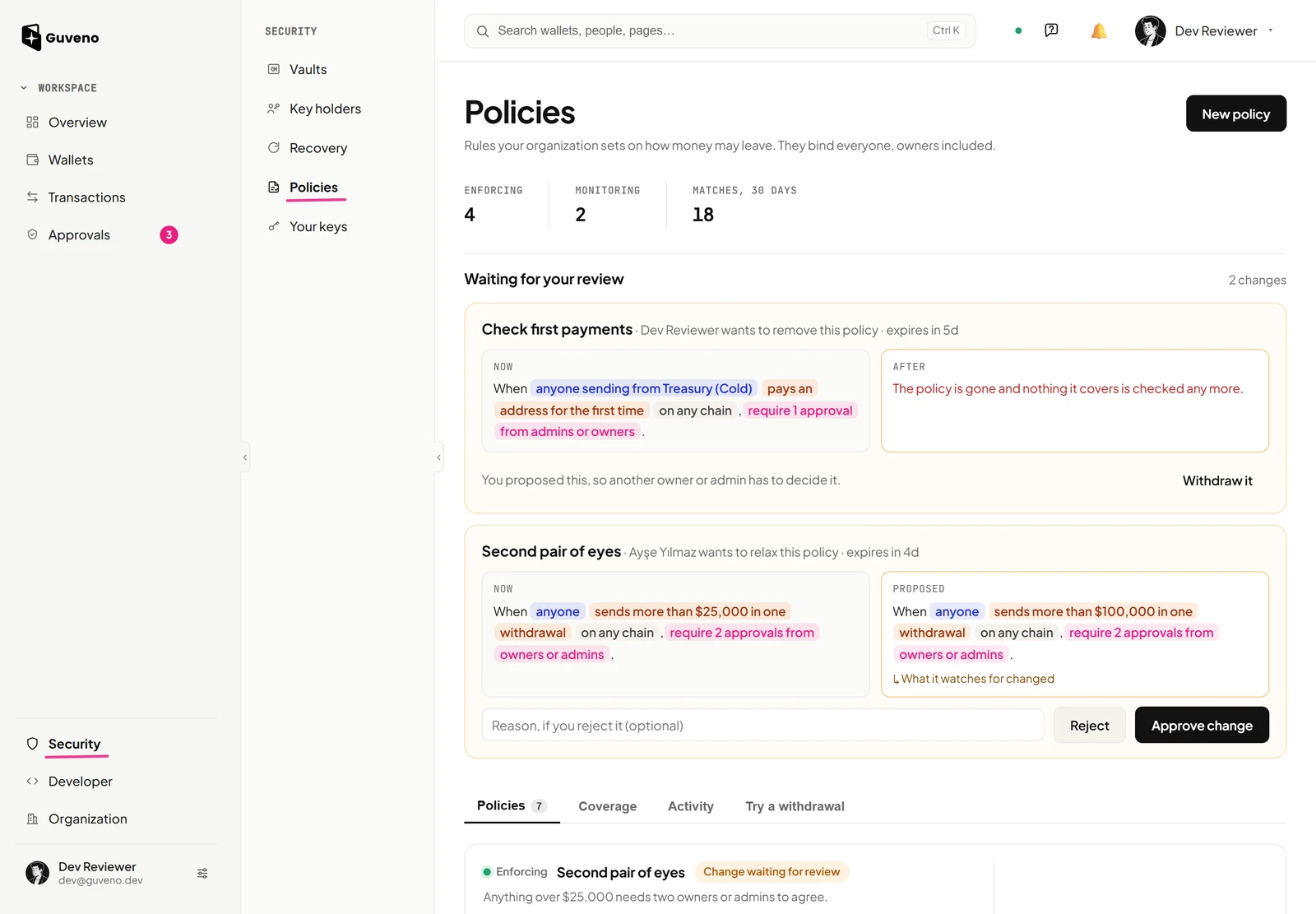
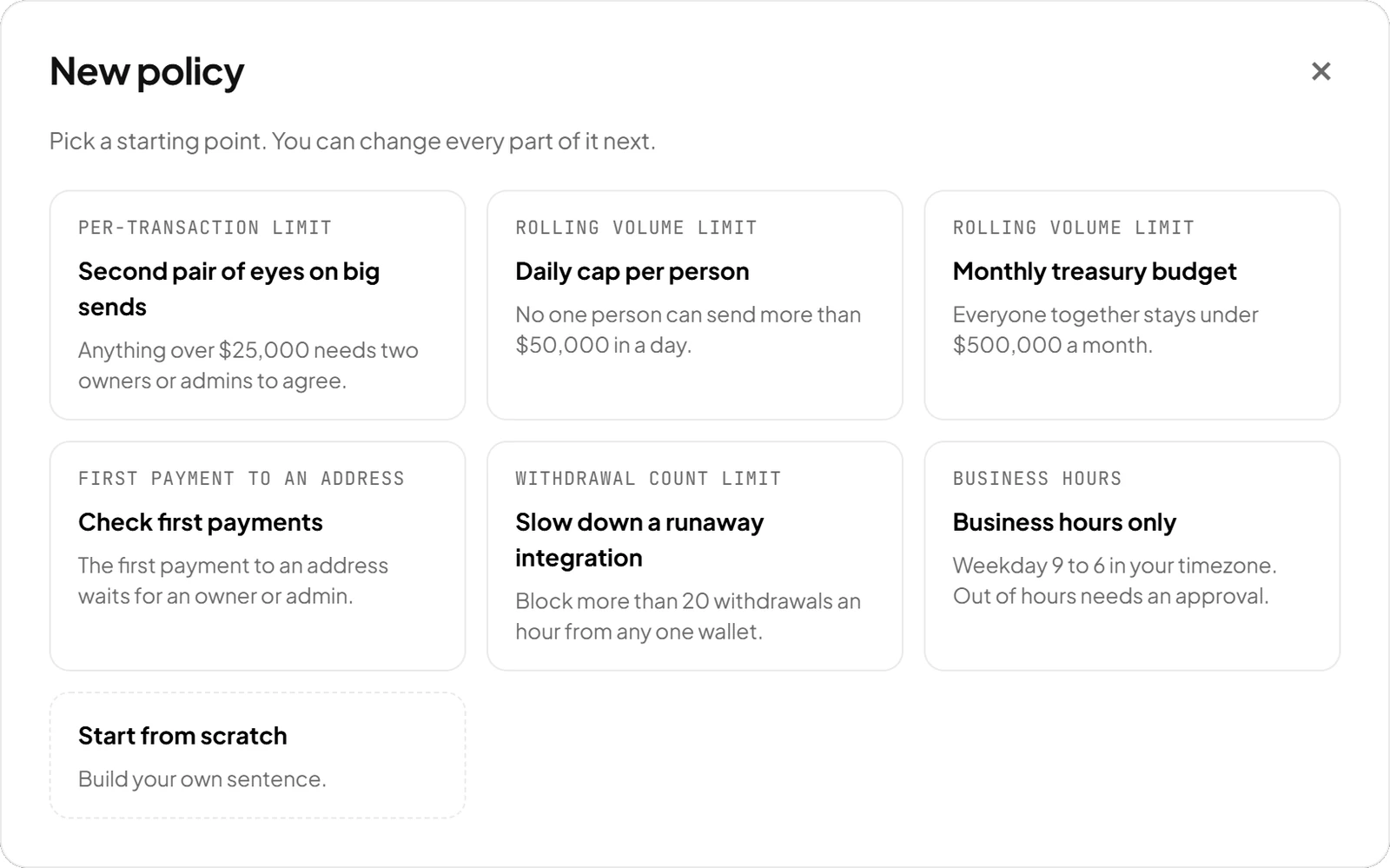
That's the structure this post describes. You build it from a few simple rules: a per-transaction limit, a rolling volume limit (say, a daily or weekly cap per person or per wallet), a withdrawal count limit, approved destinations only, the first payment to an address, and business hours. When a rule matches, the policy can block the payment, require 1 to 5 sign-offs from the roles you choose (owners, admins and signers are the ones who can approve), or let it through and notify owners and admins.
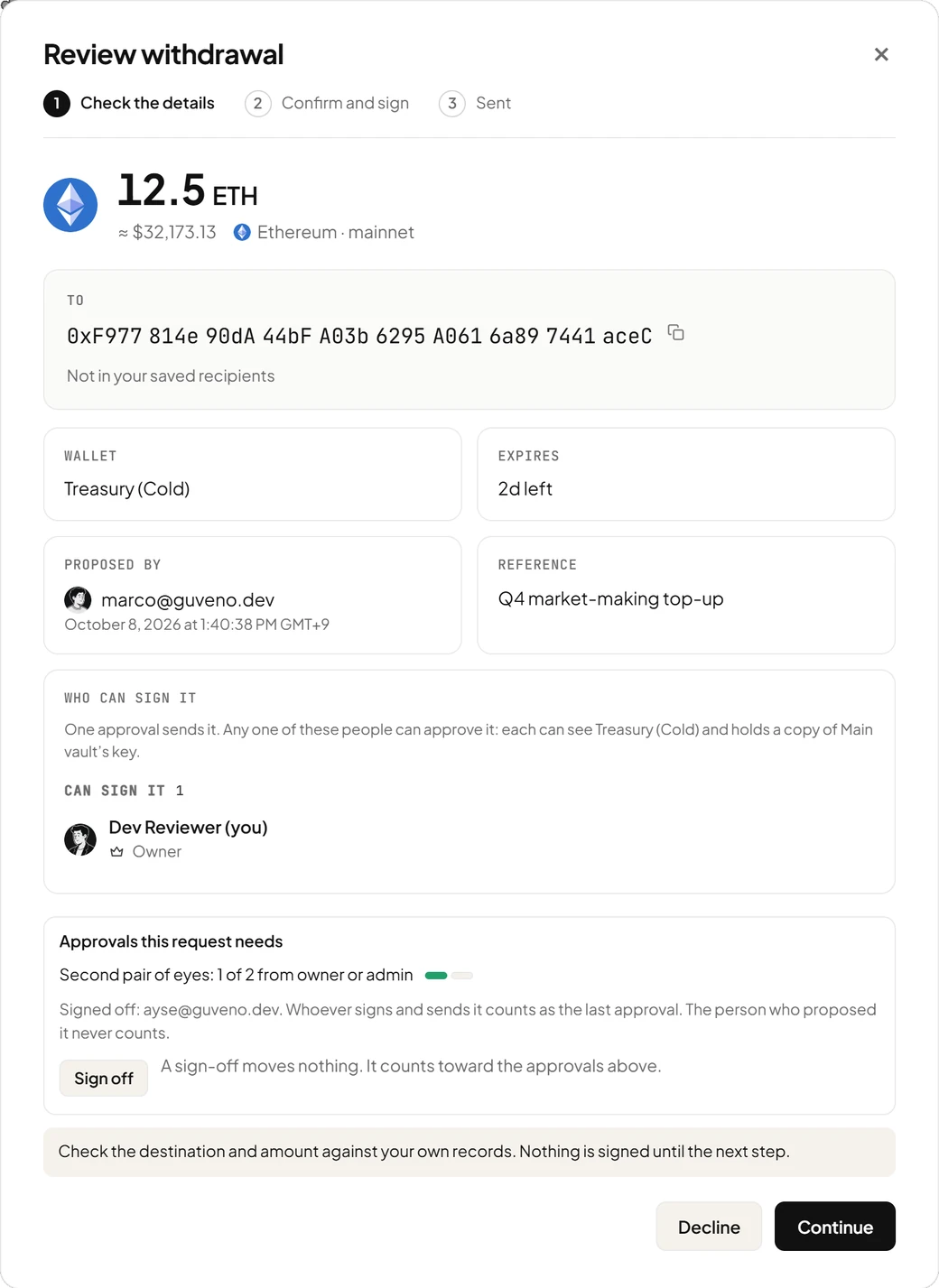
Routine payments go straight through for anyone who holds the wallet's key (members can only request withdrawals, so theirs always wait for approval). Unusual ones wait on the Approvals page until the right people sign off. The person who asked for a payment never counts as one of its approvers, not even when they asked through their API key.
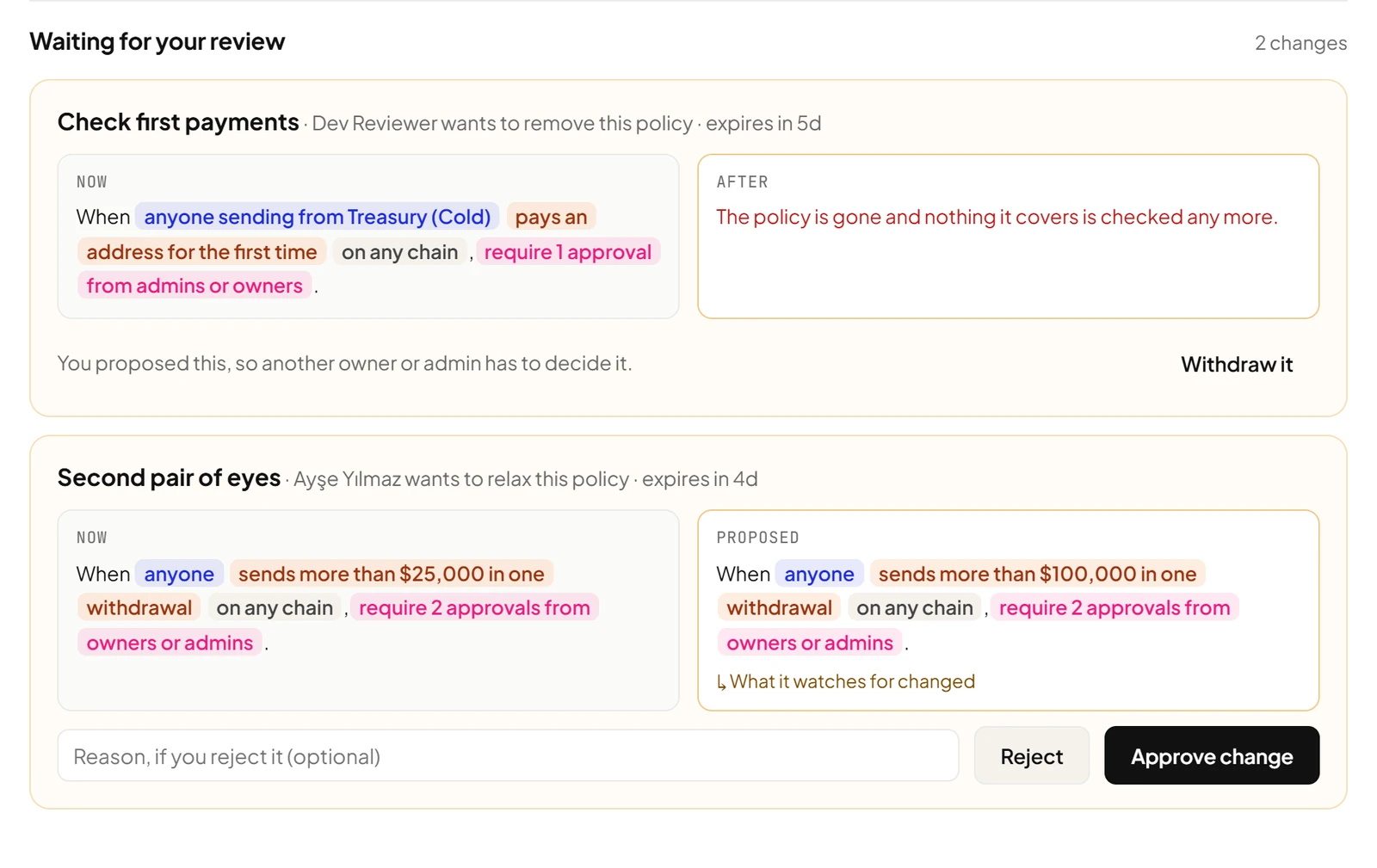
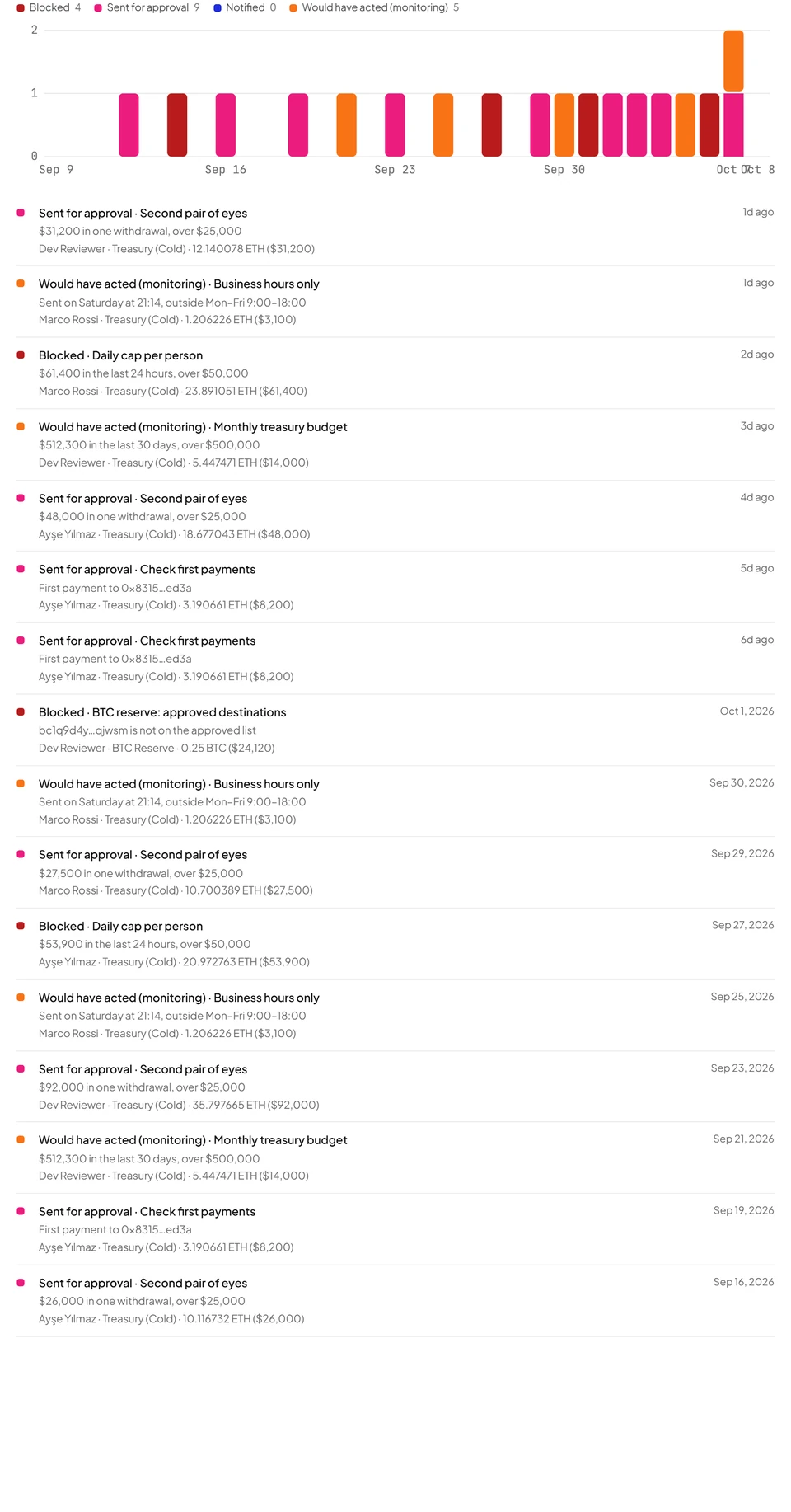
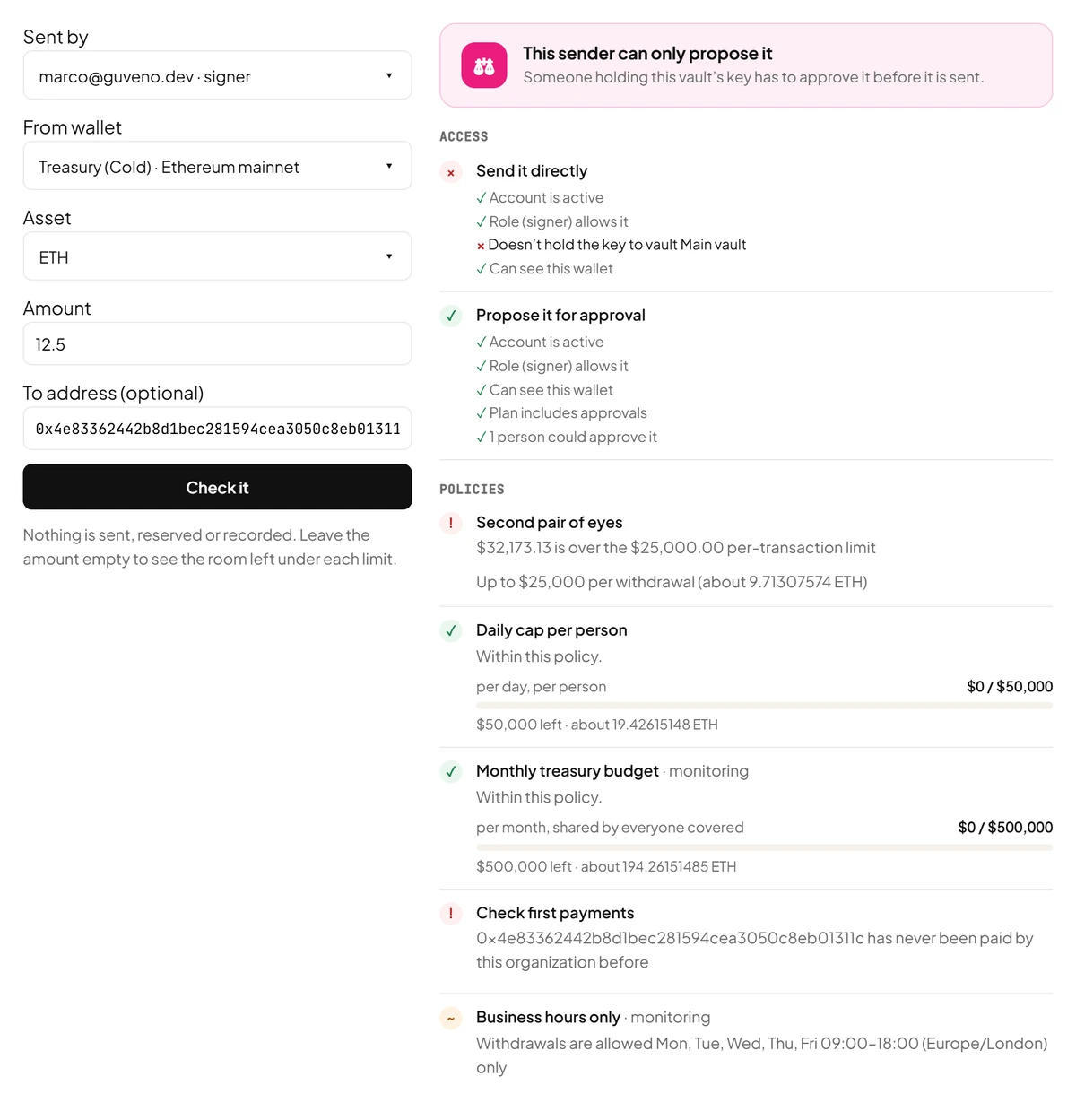
Loosening or removing an active policy needs a second owner or admin to agree, if you have one. And you can start a new policy in Monitoring mode to see what it would catch before it stops anything. Or try a withdrawal on the Policies page to see which policies it would hit, without sending anything.
Approvals are checks Guveno runs before anyone signs, not on-chain multisig. Guveno isn't a custodian or an exchange, so the policy is yours to design. We just try to make it easy to run.
Closing thoughts
A good approval policy is mostly invisible. Contractors get paid on Friday, nobody chases an approver at a football game, and the one weird request that does show up gets the full attention it deserves because the approvers haven't spent the week clicking "yes" on autopilot.
Start with what you actually pay. Set thresholds just above normal. Give every role a backup. Write down your refusals. Then check every few months whether the policy still matches how your team really works.
Safety and speed aren't opposites here. The slow, careful review only works if you save it for the payments that need it.
Setting up team approvals for the first time? Take a look at how vaults and spending policies work in Guveno, and see what a calmer Friday looks like.